Salesforce lightning migration: Business benefits over classic
Over 80% of Salesforce customers have already transitioned to Lightning. If your organization is still operating on Classic, you’re swimming against digital evolution. Salesforce is fully committed to Lightning, which makes Salesforce Lightning migration a business requirement, not a nice-to-have.
While Salesforce has continued to evolve, Classic remains largely static. Organizations on Lightning are gaining access to AI-driven capabilities, smarter automation and faster development cycles. This article explains why Lightning migration matters, what the transition involves and how to approach it strategically.
Before we dive into the details, it’s worth understanding what truly makes this shift unavoidable.
Why migrate from Salesforce Classic to Lightning?
The question is no longer if Salesforce Lightning migration should happen. It’s when. Salesforce has made its position clear:
All meaningful platform advancements are built for Lightning. Classic now receives only critical security fixes and compliance updates. No new features. No architectural upgrades.
What that means in practice is simple. Staying on Classic limits your ability to compete.
What you’re missing on Classic
Lightning delivers nearly 2,000 features that Classic does not support. These aren’t cosmetic upgrades. They directly affect productivity, decision-making and scale.
Some of the most important Salesforce Lightning benefits include:
- Salesforce CRM Analytics for AI-driven predictions and insights
- Advanced Flow automation to handle complex business logic without code
- Dynamic dashboards for real-time visibility and collaboration
- Modern UI components that reduce friction across workflows
Each of these capabilities improves efficiency and revenue potential. None of them are available in Classic, which is why salesforce lightning migration continues to accelerate.
The cost of waiting
Postponing Salesforce Lightning migration does not preserve stability. It increases long-term cost and operational friction.
- Development teams continue building custom workarounds for problems Lightning already solves declaratively
- Sales teams struggle with rigid interfaces while competitors operate faster on mobile-first experiences
- Support teams handle higher case volumes that could be reduced through intelligent automation
- Organizations pay licensing fees for capabilities they cannot access
Each quarter of delay widens the gap between Classic users and Lightning-first competitors.
When is the right time to migrate from Classic to Salesforce Lightning?
Salesforce Lightning migration succeeds when organizational stability aligns with technical readiness. There are three conditions that matter most:
- Operational stability: Avoid migrating during peak sales cycles or critical project launches.
- Infrastructure clarity: Understand your customization depth, integrations and AppExchange dependencies upfront.
- Leadership and user alignment: Executive sponsorship and early user involvement reduce friction and acceleration adoption.
Mid-market and enterprise organizations with complex customization requirements benefit most from phased migration rather than a big-bang switch. If your team has discussed Salesforce Lightning migration, the competitive window is narrowing. The time to act is now. For organizations with complex environments, this stage often reveals the need for experienced Salesforce development services to manage customization depth and integration dependencies.
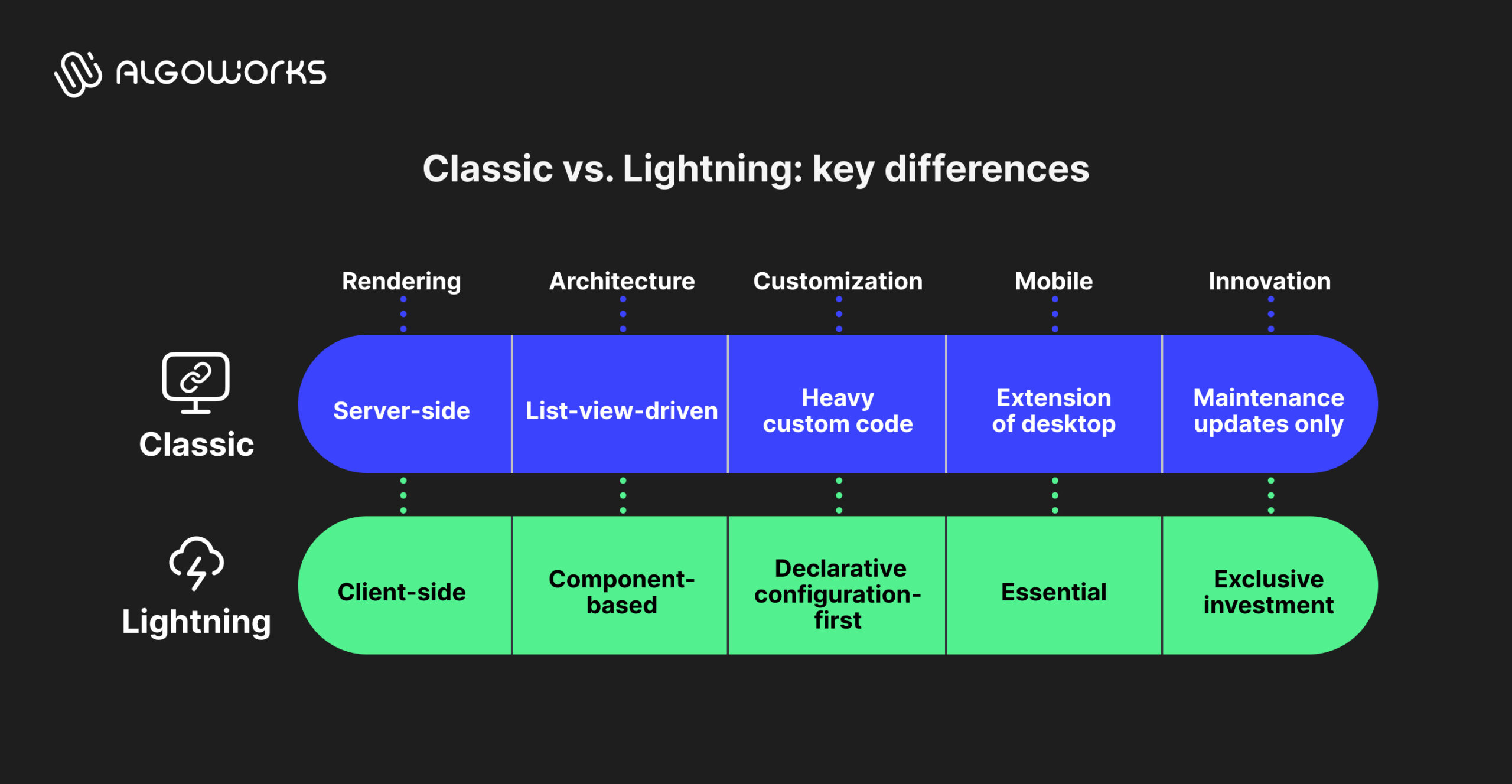
Classic vs Lightning: Understanding the fundamental difference
This shift is not about a new look. Salesforce Lightning migration represents an architectural change that affects performance, customization, mobility and long-term capability.
To understand why Lightning feels fundamentally different, it helps to start with how the two platforms are built.
The architectural difference at the core
At a foundational level, Classic and Lightning follow very different design models.
| Salesforce Classic | Salesforce Lightning |
| Server-side rendering | Client-side rendering |
| List-view-driven workflows | Component-based architecture |
| Heavy reliance on custom code | Declarative, configuration-first design |
Classic relies on server-side processing, which makes interactions heavier and slower over time. Lightning uses client-side rendering through Lightning Web Components, resulting in faster page loads, quicker actions and noticeably better performance across daily workflows.
Easier customization, faster change
In Classic, even small changes depend on JavaScript buttons and hardcoded logic, making developers constant gatekeepers. Lightning removes much of this friction. With drag-and-drop tools like App Builder, administrators can update layouts and workflows directly. Changes that once took weeks can now be completed in hours.
Built for mobile and modern teams
Classic treats mobile as an extension of desktop. Lightning treats it as essential. Its responsive design works seamlessly across devices, allowing sales and support teams to work consistently whether they are in the office or on the move.
A gap that keeps growing
Salesforce invests exclusively in Lightning. AI-driven insights, advanced automation, real-time collaboratio and enhanced security are all Lightning-only capabilities. Classic receives maintenance updates, but no new innovation. Over time, this creates a widening capability gap that directly affects speed and competitiveness.
Check out: How Salesforce AI agents are transforming automation?
Salesforce lightning migration cost and ROI reality
Organizations frequently underestimate Salesforce Lightning migration costs by narrowly focusing on consulting fees while overlooking internal resource allocation. Transparent cost analysis requires understanding both direct expenses and hidden organizational costs.
Direct implementation costs
For most mid-market organizations, Lightning migration typically ranges between $50,000 and $150,000. Costs are driven more by customization depth and integration complexity than by user count. This usually includes readiness assessment, migration planning, code refactoring, integration updates, testing and post-launch stabilization. Certified Salesforce Lightning consultants generally charge between $150 and $300 per hour.
Hidden organizational costs
Beyond direct implementation costs, internal effort plays a significant role. Development teams may pause feature work during migration. AppExchange apps need compatibility checks. Integration testing spans multiple cycles. Training, change management and short-term productivity dips are common. Together, these factors often account for 30–40% of the overall migration effort.
The ROI equation
Despite these costs, the business case is compelling. Forrester research establishes documented 341% ROI incorporating revenue generation improvements, operational efficiency gains and customer retention enhancement. Organizations typically realize breakeven within the first year.
Development timelines compress approximately 50% through Lightning’s declarative capabilities. One mid-market organization reduced its support team from 20 personnel to 10 full-time equivalents post-migration, generating annualized savings exceeding $500,000 while maintaining service quality. Sales teams demonstrate accelerated deal closure through improved data visibility after Salesforce Lightning migration. Support organizations reduce response times through streamlined case navigation.
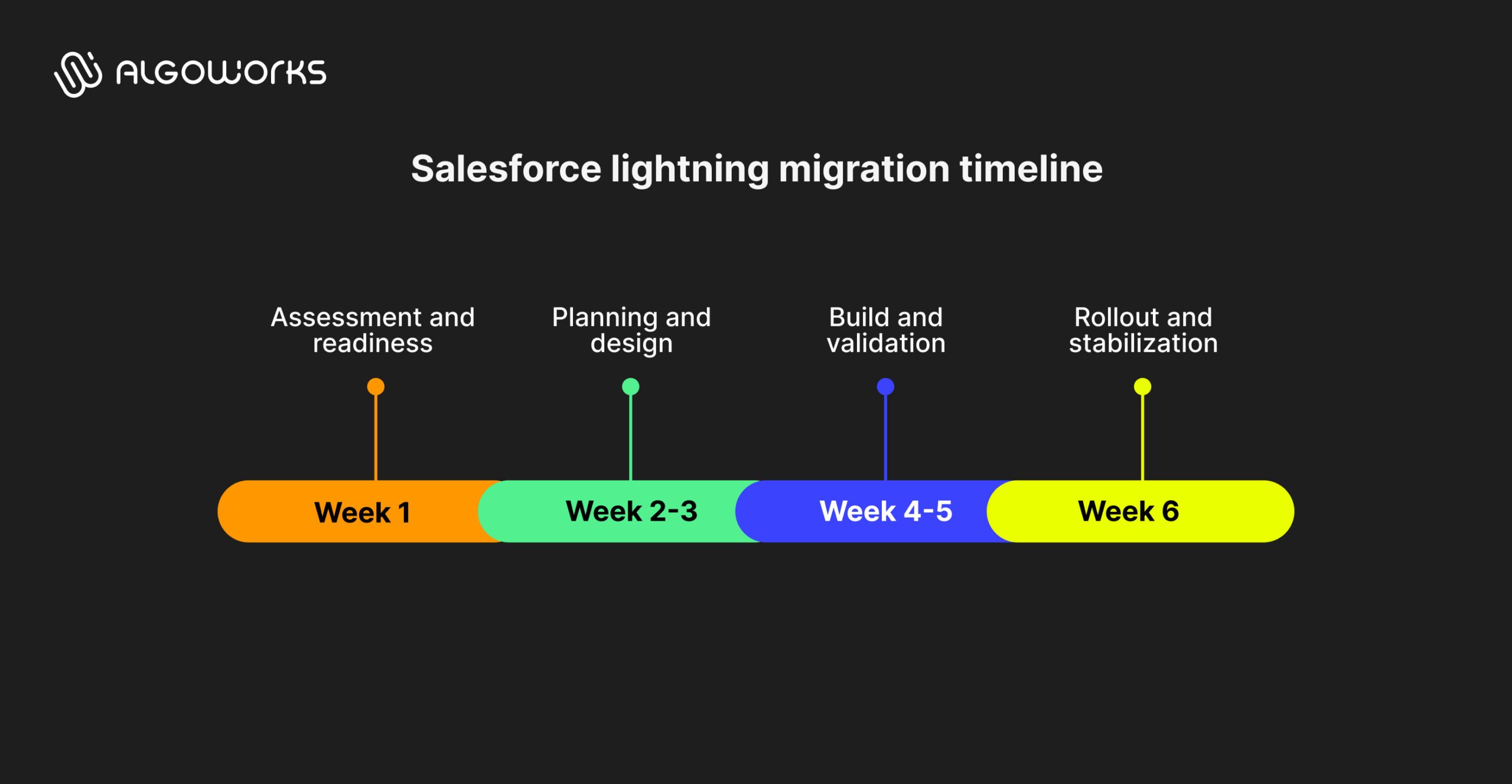
Six-week implementation framework
A Salesforce Lightning migration typically follows a structured six-week timeline. For organizations with heavy customizations or complex integrations, this may extend slightly, but the core flow remains the same.
Week 1: Assessment and readiness
The first week is about understanding what you’re working with. Teams run the Lightning Experience Readiness Check to identify incompatible customizations and potential blockers. Salesforce Optimizer is used to surface unused fields, metadata and inefficiencies.
At the same time, a complete inventory of custom code, Visualforce pages and integrations is created. This week also sets the baseline. Productivity metrics, case resolution times and sales cycle duration are captured so improvements can be measured after migration.
Weeks 2–3: Planning and design
With a clear picture of the current environment, the focus shifts to planning the transition. A detailed migration roadmap is created, often segmented by user roles and teams.
During this phase, gaps between Classic and Lightning are identified and solutions are defined. New Lightning page layouts are designed using App Builder and key stakeholders are aligned on what will change and why. This is also when training plans and change communication are finalized to prepare users ahead of rollout.
Weeks 4–5: Build and validation
These two weeks are dedicated to execution. Custom pages and workflows are rebuilt using Lightning components. Visualforce pages are refactored into Lightning Web Components where needed. Integrations and API references are updated to ensure compatibility.
Testing happens in parallel. Power users validate functionality in sandbox environments, performance is measured and any issues are addressed. The goal here is stability and confidence before users are moved to Lightning.
Week 6: Rollout and stabilization
The final week focuses on enabling users and stabilizing the system. Rollout usually happens in phases, starting with administrators and internal champions before expanding to wider teams.
Hands-on, role-specific training is delivered and support processes are put in place to handle questions or issues quickly. Classic access is often kept temporarily to allow a smooth transition. Adoption and usage metrics are closely monitored to ensure teams are comfortable and productive in Lightning.
Also check: Best Ideas for Increasing Your Salesforce ROI
Benefits realization across stakeholders
| Stakeholder | Key benefits from Salesforce Lightning |
| Business leaders |
|
| System administrators |
|
| Sales teams |
|
| IT teams |
|
Take action today
If Salesforce Lightning migration is on your roadmap, the smartest place to start is clarity.
A focused readiness assessment helps you understand what will migrate smoothly, what needs refactoring and where risks exist. For many organizations, this step is part of a broader effort around migrating to Salesforce Lightning while modernizing existing systems.
The difference between a smooth migration and a painful one is experience. Teams that have done this before know where delays happen, what to fix first and how to keep momentum without disrupting day-to-day work.
Your Salesforce Lightning migration doesn’t start with code. It starts with the right conversation.
FAQs
Not immediately, but no new features are being developed.
Most organizations complete migration in six to eight weeks.
Yes, but Lightning is intuitive and adoption is usually quick.
Yes, Classic access can remain temporarily.
Yes, Lightning consistently delivers better performance.