Agentforce readiness checklist: 20 capabilities to validate before go-live
Most Agentforce deployments fail quietly. Not because the technology doesn’t work, but because organizations treat it like any other Salesforce implementation. Configure, test, launch. That approach ignores what makes Agentforce different from standard Salesforce automation. Understanding Salesforce Agentforce is the starting point for closing that gap. According to Salesforce’s 2025 Connectivity Benchmark Report, 93% of IT leaders plan to deploy autonomous AI agents within two years. The ones that struggle almost always skipped the readiness work.
Unlike a standard Salesforce rollout, Agentforce does not surface errors when something goes wrong. It answers confidently and incorrectly. That is significantly harder to catch than a failed workflow or a broken integration. The impact compounds with every interaction.
This article walks through 20 capabilities you need to validate before go-live across five readiness areas
- Business alignment
- Data quality
- Governance
- Security
- Technical architecture
What Agentforce readiness actually means
Standard Salesforce go-live checklists ask whether configuration is correct, integrations are working and users are trained. Those questions still matter. But Agentforce adds a different layer of validation entirely.
You are no longer just checking what the system can do. In fact, you are validating what the agent is allowed to handle, which information it can access, which actions it can execute, how it responds when context is incomplete and when it should escalate rather than act. These are not configuration questions. They are operational and governance questions that standard QA cycles are not built to answer. 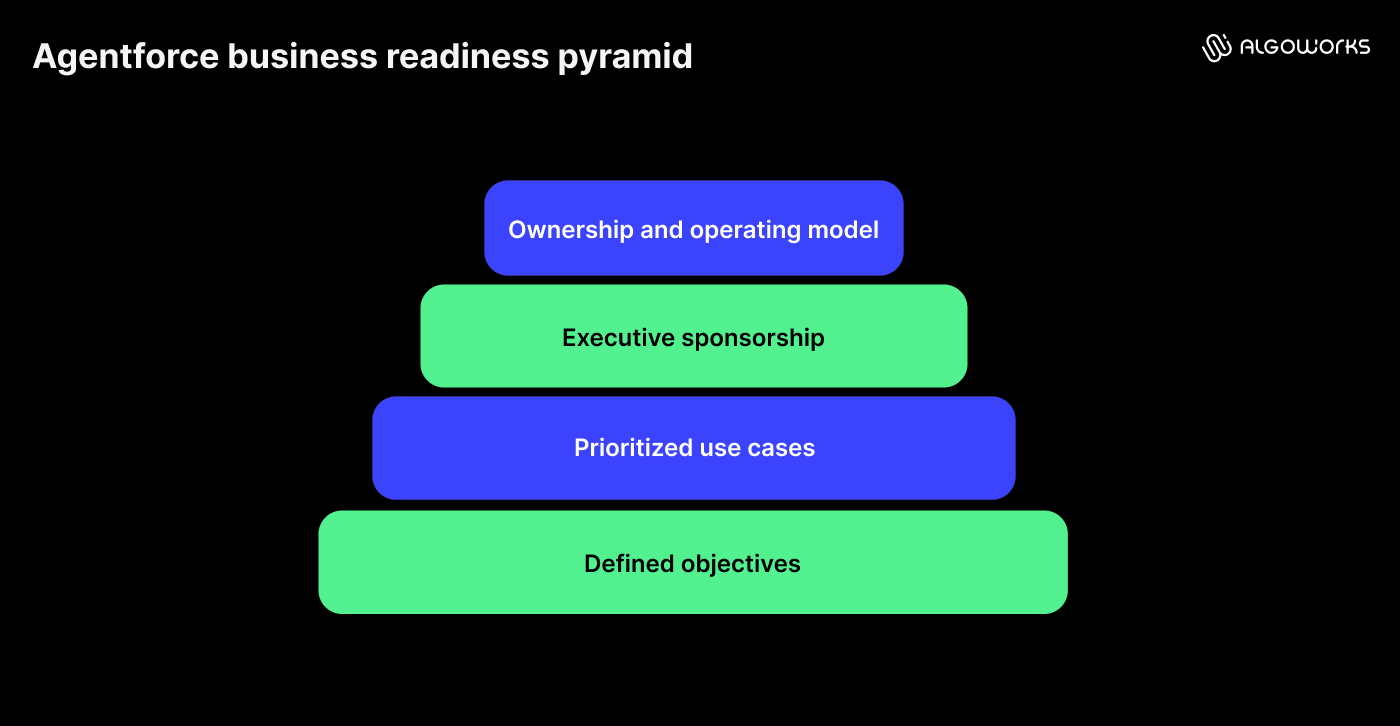
Business readiness: Can Agentforce deliver measurable outcomes?
Agentforce deployments that skip business alignment tend to follow a predictable pattern: agents get built around the demo use case, not the actual business problem. Within weeks they are handling edge cases they were never designed for, with no metric to measure success against. The enterprises that locked down objectives before building anything are the ones Salesforce AI agents are actually transforming.
Defined business objectives
Before any setup begins, stakeholders should answer one question: what business problem is this solving? The objective needs to be specific and measurable: reducing case resolution time by 30%, increasing self-service adoption across tier-1 queries or automating lead scoring for high-volume inbound.
Prioritized use cases
Not every process should be automated in the first wave. Evaluate each use case against business impact, process complexity, data availability, risk level and expected ROI. A single well-scoped agent (one channel, two or three defined topics, a clear escalation path) tested against real historical conversations before touching live interactions is worth more than five agents built in parallel on assumptions.
Executive sponsorship
Without executive backing, deployments stall the moment priorities shift or cross-team resistance emerges. Sponsorship here is not ceremonial. It provides decision-making authority and keeps ownership clear when things need to change after launch.
Ownership and operating model
Who owns Agentforce after it goes live? Business leads, Salesforce admins, architects, security teams and compliance owners all need defined roles before deployment. Many organizations establish an Agentforce Center of Excellence at this stage to own governance, track performance and guide future expansion. Without that structure, accountability quietly disappears. 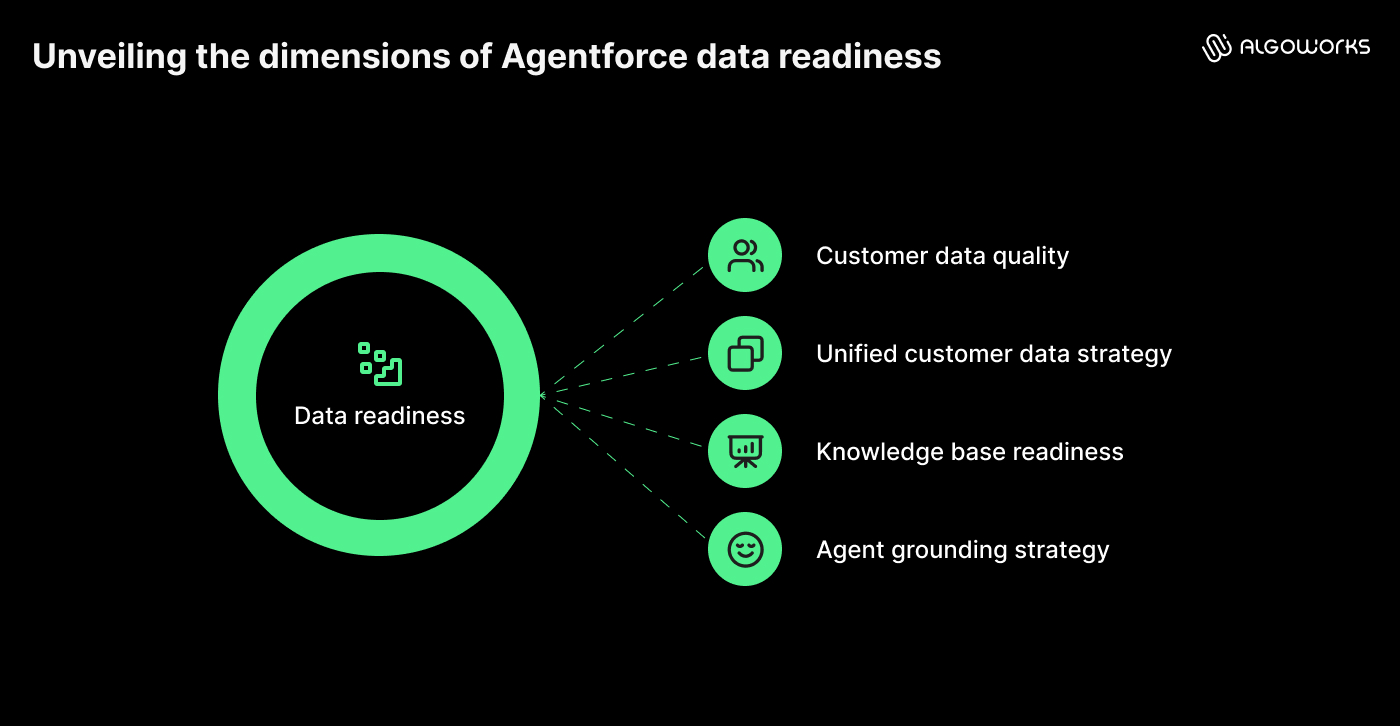
Data readiness: Is your Salesforce data ready for Agentforce?
Data readiness is the single biggest factor in Agentforce success. An Agentforce service agent pulling from a Salesforce org where case records have missing product fields or outdated account data will recommend the wrong resolution path, confidently, every time. That is not an AI problem. It is a data problem the agent makes visible at scale.
Customer data quality
Can your users genuinely trust the information inside Salesforce today? Duplicate accounts, missing field values, outdated records and conflicting data across connected systems are not just CRM hygiene issues. For Agentforce, they are decision-making inputs. If three versions of the same customer record exist in your org, the agent may retrieve information from any of them depending on context. Set quality standards and a cleanup plan for critical fields before any agent goes live.
Unified customer data strategy
Most enterprises store customer data across Salesforce, an ERP, a marketing platform and several service tools. Agentforce works best when it has full context, not a fragment of it. This is where Salesforce Data Cloud plays a key role, unifying customer data across systems so agents have the complete picture when they need it.
Knowledge base readiness
Agentforce treats approved content as authoritative. It has no way of knowing which version is correct if conflicting content exists. A deprecated refund policy and a current refund policy may both sit inside Salesforce Knowledge. Without content governance, the agent may retrieve either one. Audit every knowledge source agents will use before launch, remove duplicates, archive outdated material and assign ownership so content stays current after go-live.
Agent grounding strategy
Once your knowledge is clean, grounding determines how Agentforce retrieves it during live interactions. Without a defined grounding strategy, even well-maintained content does not reliably reach the agent when it needs it. Define which sources are approved, how retrieval logic works, how content updates are pushed through and what happens when the agent encounters a question it cannot answer with confidence. This is the mechanism that connects clean content to accurate responses. 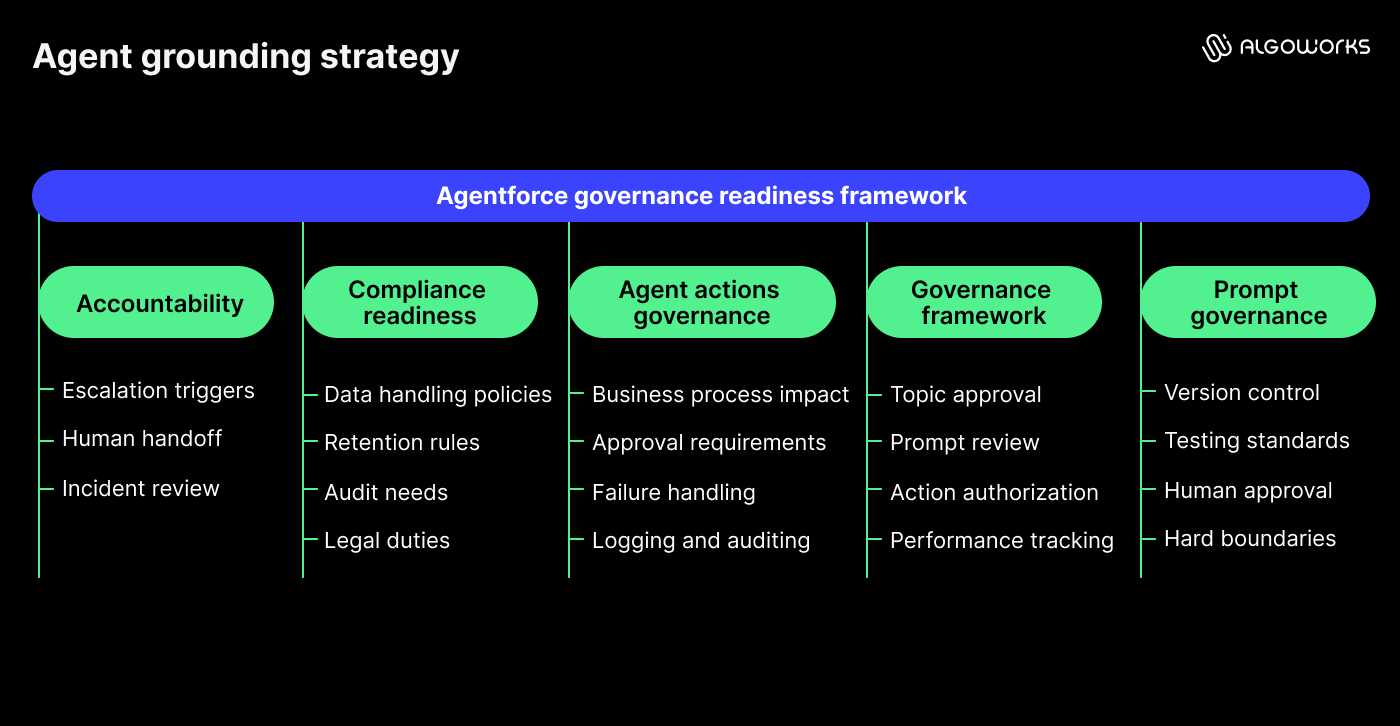
Governance readiness: Do you have the right controls in place?
A prompt change approved informally by one team member can alter how an agent handles every customer interaction across the org, with no version history and no rollback. That is what unmanaged governance looks like in Agentforce. It is more common than most teams expect.
Agentforcegovernance framework
Governance in Agentforce covers four areas: who can approve topic changes, how prompts are reviewed before production, how actions are authorized and how performance is tracked over time. Before launch, document all four. Without this structure, even a well-built agent becomes unmanageable once a second or third use case is layered on top.
Prompt governance and agent topics
Prompts and agent topics both shift as business needs evolve. A governance framework should enforce version control and testing standards, so changes are traceable. Define which topics agents can act on independently and which require human approval before the agent proceeds. Guardrails that set hard boundaries on what agents can and cannot do should be in place before go-live, not written after the first incident.
Agent actions governance
Answering questions is relatively low risk. Acting is where the stakes increase. Agentforce can trigger Flows, update records, create cases, send notifications and interact with external systems. An incorrect response can usually be corrected. An incorrect action (a duplicate case created, a record updated with wrong data, a notification sent to the wrong contact) may require operational remediation and erodes user trust quickly. Before enabling any action, document what business process it affects, whether approvals are required, what happens when it fails and how it is logged and audited.
Compliance and regulatory readiness
Compliance needs vary by industry and region. Healthcare teams handle patient privacy. Financial firms carry reporting duties. Global companies navigate data protection rules across multiple markets at once. Run a compliance review before launch that covers data handling policies, retention rules, audit needs and legal duties by region. Treating this as a post-launch task is far more costly than handling it upfront.
Accountability and escalation paths
Agentforce will encounter questions it cannot answer, cases it was not built for and situations where human judgment is needed. Every deployment needs clear escalation triggers, human handoff workflows and an incident review process. When something unexpected happens, it should be immediately obvious who steps in and what they do. 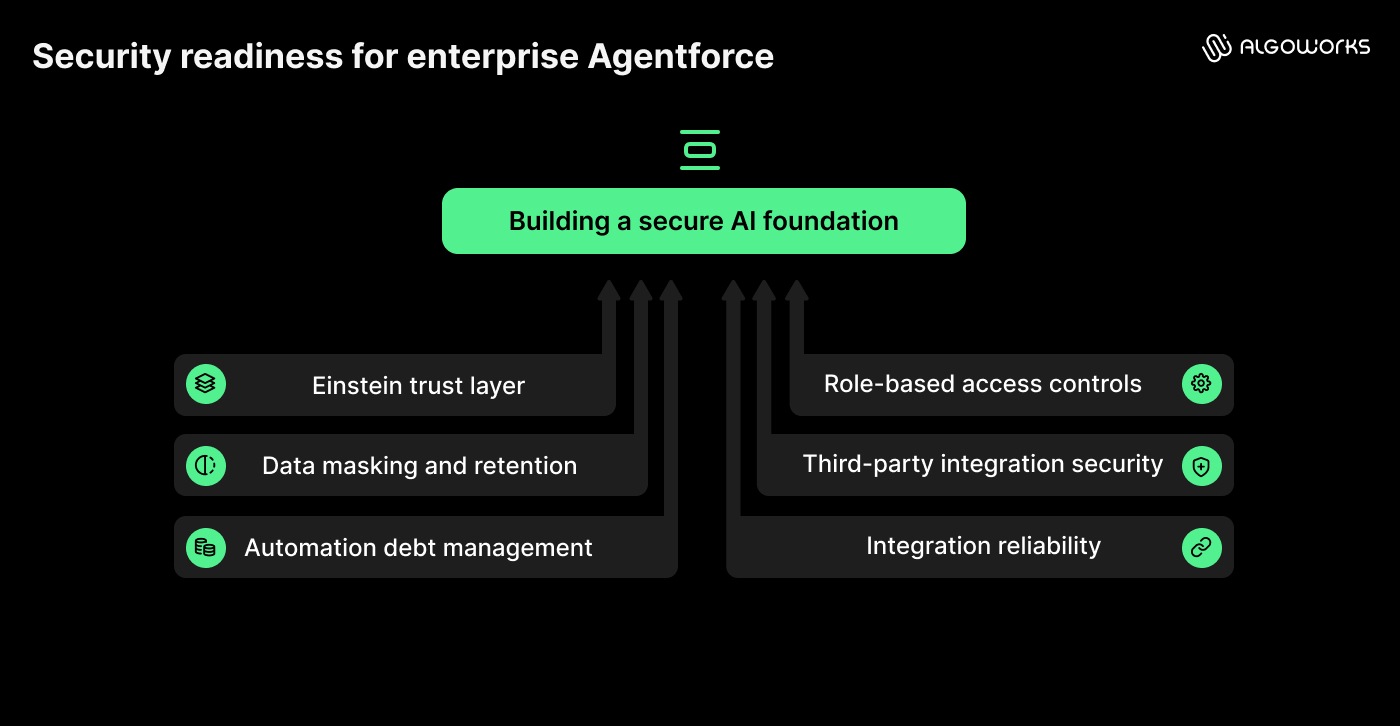
Security readiness: Can Agentforce operate securely at scale?
Agentforce runs on the Einstein Trust Layer, Salesforce’s built-in framework for managing data flow between your org and the LLM. It is not a passive infrastructure. If you enable Agentforce without configuring the Trust Layer for your specific data model, sensitive fields are sent to the LLM unmasked; third-party providers and outputs may go unscreened.
Role-based access controls
Agentforce should never surface data that a user would not normally be allowed to see. Access gaps are among the most common issues in enterprise AI deployments. Before go-live, review user profiles, permission sets, sharing rules and external access controls. Agentforce should follow your existing security model, not operate outside it.
Data masking, toxicity detection and zero data retention
The Einstein Trust Layer handles three critical controls that need active configuration. Data masking intercepts sensitive fields (personal ID numbers, financial records and health data) before the prompt is sent to the LLM, then restores them in the response. Toxicity detection screens LLM outputs for harmful content before they reach users. Zero data retention ensures prompts and completions are not stored by third-party providers. None of these are on by default. Each needs to be configured intentionally for your data model and validated before go-live.
Third-party integration security
Most Agentforce deployments connect to external systems: ERPs, support tools and document storage. Every connection adds risk. External callouts from agent actions should use Named Credentials rather than hardcoded credentials. This is both a security best practice and an Einstein Trust Layer requirement. Validate API controls, encryption standards and the security posture of each vendor before launch.
Technical readiness: Is your Salesforce architecture prepared?
Agentforce performance depends on the health of your Salesforce environment. Technical debt and design limits that barely affect standard CRM operations can create real problems once an AI layer runs on top.
Automation debt and platform health
Agentforce agents trigger actions through your existing Flows and Apex. If those automations are tangled, the agent inherits the problem. Old Process Builder rules, duplicate Flow triggers and Apex conflicts that have been dormant for years tend to surface the moment an AI-driven process is introduced. Map every automation on your core objects, consolidate where possible and retire what is no longer active before you add an AI layer on top. Salesforce’s own guidance is clear: migrate off Process Builder and into Flow before deploying Agentforce.
Integration reliability
The question is not whether integrations exist. It is whether they are solid enough to support live AI interactions rather than just standard CRM use. Check data sync accuracy, API performance, error handling and how outdated data gets flagged before it reaches the agent.
Release management and rollback planning
When a Flow that an agent depends on gets updated by an admin who does not know the agent uses it, you get a silent failure with no alert. This is one of the more common post-launch issues in Agentforce deployments. A deployment plan that includes sandbox testing, release approvals, rollback steps and production monitoring from day one catches these before they reach customers.
Testing readiness: Have you validated Agentforce before launch?
Standard Salesforce testing validates that workflows run and permissions are set correctly. Agentforce testing has to go further: does the agent match the right topic, retrieve the right information, stay within its access boundaries and escalate correctly when it should not act autonomously?
Testing with Agent Builder and performance validation
Use Agent Builder to test how your agents behave across real scenarios, not just the ideal path. If you want a deeper look at how Agentforce AI assistants are built and tested, that covers the full development and testing process end to end. Build test conversation sets that cover the edge cases agents will hit in the first 30 days: mis-spelled inputs, out-of-scope queries, multi-step requests and scenarios where the agent should escalate rather than act.
Beyond functional testing, validate response accuracy, hallucination rates and system performance under realistic load before going live. Escalation paths defined in governance need to be tested here too. Confirm they trigger correctly and hand off to the right person in the right workflow. These metrics collectively are your baseline. You will need them when agent behavior shifts and you need to understand why.
Reading this is not the same as assessing your organization
Most teams self-assess as more ready than they are because they are measuring against what they know, not against what they have not thought to check yet.
We put together the Agentforce Readiness Scorecard for exactly this. It takes each of these 20 areas and turns them into direct questions about your org: data quality, Einstein Trust Layer configuration, governance documentation, automation health and more. The score tells you where you stand and which gaps to fix before you go anywhere near production.
Download the Agentforce Readiness Scorecard and find out where you actually stand.
If you want to go further with Salesforce implementation, our team can run a full readiness review against your environment, identify what needs to be fixed and build a deployment roadmap from there. Get in touch to set that up.
FAQs
A standard go-live checklist validates that features are configured, permissions are set and workflows run as expected. Agentforce readiness goes further because the system makes autonomous decisions and takes actions on your behalf. You also need to validate data quality, grounding strategy, Einstein Trust Layer configuration, agent topics, action governance, escalation paths and how the agent behaves in scenarios it was not explicitly trained for.
For a focused first deployment, a readiness review typically takes two to four weeks. Organizations with complex data environments, multiple integrations or regulated industry requirements should plan for longer, since data cleanup and compliance reviews are usually the longest phases.
Data Cloud is not required for every deployment, but it significantly improves what agents can do. Without it, agents work from the data in your core Salesforce org. With Data Cloud, agents access a unified customer profile pulled from across your systems, which leads to more accurate and relevant responses.
The Einstein Trust Layer is Salesforce's built-in security framework for AI. It handles data masking before prompts reach LLMs, runs toxicity detection on outputs and enforces zero data retention so your data is not stored by third-party providers. It is not active by default. Each component needs to be configured for your data model and compliance requirements before any agent goes live.